
one of biggest skins trade platform
No code provided. Visit using the referral link.
4TMR · DISCOVERY
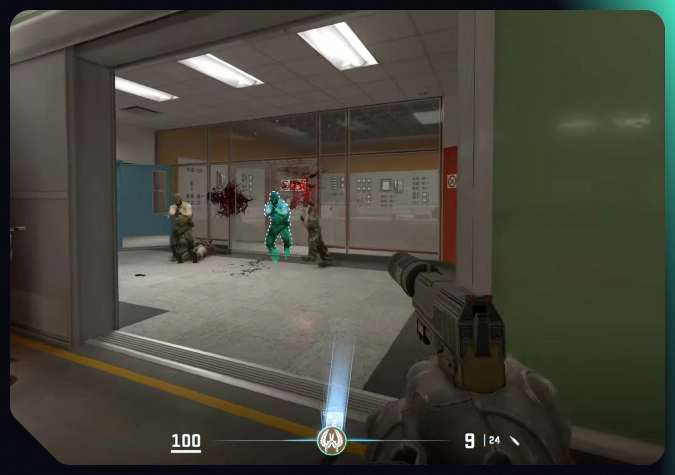
The classic synchronization scheme between the Counter-Strike server and players’ computers comes with an inevitable delay. Every player action should first be confirmed by the server, before it is reflected on the monitor. With damage prediction in CS2, the delay disappears.
When this feature is turned on, the game predicts the outcome of your shots and shows the relevant animation without waiting for confirmation from the server. It allows players to switch to other actions—and the next victims—slightly quicker. Sure, even a few moments can be crucial for such a fast-paced game as Counter-Strike.
In this article on DMarket Blog, we dive into the damage prediction feature, to help you understand it better and figure out whether damage prediction in CS2 should be on or off specifically for your situation.
Damage prediction was added to Counter-Strike 2 with the November 2024 update. It is the mechanism of reducing synchronization delays by launching shot and kill animations before receiving confirmation from the server.
It’s what damage prediction in CS2 is and how it works.
Starting the animation effects early is based strictly on the game’s calculations. But there are some nuances—which often happen due to the unpredictable behavior of players and the fast pace of actions. Mistakes in damage predictions are real!
CS2 damage prediction works well in matches with low ping for all the participants. In such games, you can benefit from this feature—especially if you like splashy aggressiveness.
When the ping is high or when the ping difference between players in one match is substantial, damage prediction becomes inconsistent and unreliable. Mistakes in the outcome calculations become more frequent, which is totally frustrating.
As damage prediction in CS2 is tightly connected to the general damage calculation, you could get some very helpful info from this advanced guide.
There are three options in the CS2 damage prediction settings. They are pretty self-explanatory.
By default, only Predict Kill Ragdolls is turned on. This means you have damage prediction for the animation of dead bodies falling after your kills—before confirmation from the server that the opponent is dead.
With high ping, all types of CS2 damage prediction are not active.
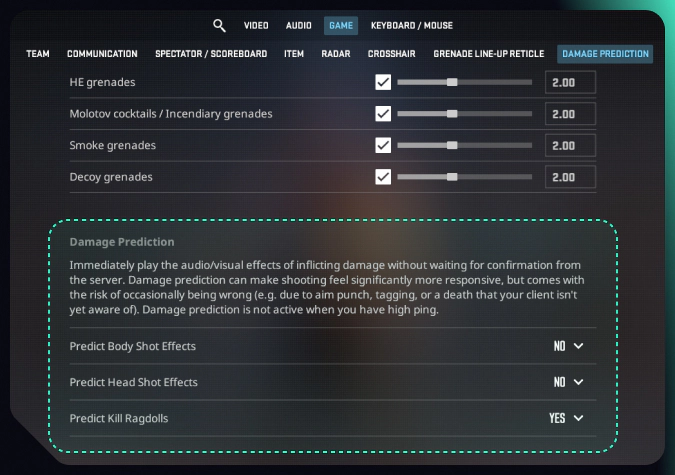
To adjust damage prediction in CS2, head to the game settings.
Thanks to the variety of options in the CS2 settings menu, you can adjust the game for your convenience pretty easily. Check out our dedicated guide to learn how to set grenade binds in Counter-Strike 2.
The feature has advantages, but the downsides of CS2 damage prediction are also substantial.
Pros ✅
Cons ❌
You should consider these factors to decide if you want your damage prediction in CS2 on or off.
Only a few CS2 esports professionals use the full set of damage prediction.
Most other players turn damage prediction off for their matches. Sure, you don’t need to copy pro competitors. Even decisions such as selecting the best mouse for playing CS2 strongly depend on your personal preferences.
If you have a good internet connection and prefer an aggressive playstyle, having damage prediction can be beneficial for your CS2 results. And even then, you shouldn’t jump into ‘Yes’ for all three options mindlessly. Try to enable them and see the real difference in the game. Otherwise, keeping the default settings is a good idea.
Before asking yourself, “Should I use damage prediction in CS2?”, ask if your skills are good enough to feel the difference. It’s not a magic tool! Only with deep experience and very good reactions, can you be on the advantageous side of damage prediction.
If you feel ready, don’t hesitate to experiment. Only your personal practical use of this feature can show if it’s good for you.
On DMarket Blog, you’ll find many helpful articles about the game itself and also about skins trading. For example, take a look at theCS2 knife cases—would you like to get a knife drop?
one of biggest skins trade platform
No code provided. Visit using the referral link.